
Welcome to the
Model Engine News
Members Only Page
Last update: February 2, 2008
This page contains updates, additions, and exclusive pages for registered owners of the Model Engine News CD and DVD Collection. Updates appear monthly, with occasional special updates in the form of extra raisins for your cookie to celebrate special events.
CD Owners
As of September 2007, which marks the two year anniversary of the CD release, the CD is declared obsolete, dead, defunct. In effect, a Past Parrot and as such, it will no longer supported. The reason for this sad turn of events being that the site plus cookie now occupies nearly two CDs and this complicates distribution and installation too much to bother with anymore. Any original, registered CD owner can upgrade to the DVD for only US$15, including postage. Sorry, but the CD issue was driving me insane!DVD Owners
You only need updates that are later than when your DVD was cut. The first four digits of the disk serial number is the year/month. For example, if your serial number starts "0703..." than it was burnt in March, 2007 and contains the March issue. Hence, you only need the updates starting with April 2007. As of September, only the previous six updates will be available. If this causes you difficulty, drop me an email (or upgrade to the latest version of the DVD for only $15 ).
Installing Updates
Please follow the link to the updates page. This page contains the last six months of updates in zip format, plus all the plan sets in PDF format.
The files in the zip must be extracted to the directory on your hard drive that contains the copy of your CD. This will insert new files in the right place, and over-write older ones with updates, but only if you specify the target location as the men directory (it's not hard):
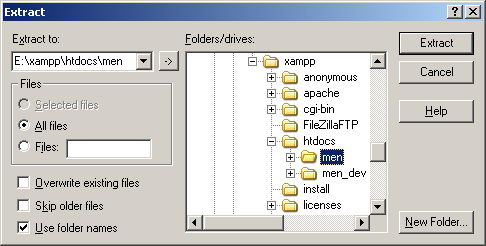 After downloading, open the ZIP by double clicking it. Click the Extract tool-bar button, then use the Files/Folders tree-view to locate and highlight the
men directory containing your hard disk copy of the CD. Click the Extract button to start the process. If you get a pop-up saying that some file already exists, click the option to allow the file to be replaced (or even the Yes to all button if there are a lot of them and you're not finding the show all that entertaining).
While the packaging of these updates is largely automated, it is tedious. I do check for completeness before posting them, but mistakes can still happen, so if any pages show missing or have broken links, missing images, etc, please let me know through enquiries@modelenginenews.org. The link below will take you to a dynamically generated downloads page. This ensures that it is always up to date, though it will show the most recent six updates only, plus all the plan sets.
The Script Updates
 The two zips under the heading Current Scripts on the updates page contain the latest versions of the scripts which make the Site Search and Custom Engine Review pages work (a "script" is fancy IT talk for programs that can be viewed as plain text). If you have set up a XAMPP local web server as described in the installation instructions and need to update, just download the zip for your brand of operating system and extract all the files in the zip to the "cgi_bin" directory in the xampp folder. The image shows the expected content of this directory, comprising the four MEN scripts, plus some standard, usless, XAMPP provided files. And if you are wondering when to do this, everyone whose CD/DVD does not contain the Feb 2008 page needs to. If you've never set up a local server, you can ignore this pair of downloads.
 Goto Update and Plans Download page